> For the complete documentation index, see [llms.txt](https://tradinggpt.gitbook.io/whitepaper/llms.txt). Markdown versions of documentation pages are available by appending `.md` to page URLs; this page is available as [Markdown](https://tradinggpt.gitbook.io/whitepaper/lending-and-browing/lending-and-borrowing-p2p/lender.md).

# Lender

Make your USDT grow safely with a 36.5% APR (annual profit).&#x20;

<figure><img src="https://4187880329-files.gitbook.io/~/files/v0/b/gitbook-x-prod.appspot.com/o/spaces%2Fxe8pEEJiLymEufx07tjx%2Fuploads%2F5tgWSo34MKy8rGfTlO7L%2F2.png?alt=media&amp;token=704180d3-f9b8-4078-8dec-558b55e71bd8" alt=""><figcaption></figcaption></figure>

### Benefits of the Lender&#x20;

* The loan is secured by collateral and liquidation conditions.&#x20;
* Collect interest every 15 days, or the borrower can prepay interest for many cycles to you.&#x20;
* Your USDT capital is safely protected on the smart contract until someone borrows it.

## How to start?

First, you need to have a TradingGPT account (if you don't have an account, contact the person who gave you this information and receive a referral link from them)

### Step 1

Log in to your account and select **Lending**

<figure><img src="https://4187880329-files.gitbook.io/~/files/v0/b/gitbook-x-prod.appspot.com/o/spaces%2Fxe8pEEJiLymEufx07tjx%2Fuploads%2FKNRIEh7T1mZyWBv90bry%2FScreenshot_2.png?alt=media&amp;token=3abc17f3-cd9a-47e7-8a58-0d725f154537" alt="" width="256"><figcaption></figcaption></figure>

### Step 2

Select  <mark style="background-color:green;">**Register as a Lender**</mark>&#x20;

<figure><img src="https://4187880329-files.gitbook.io/~/files/v0/b/gitbook-x-prod.appspot.com/o/spaces%2Fxe8pEEJiLymEufx07tjx%2Fuploads%2FLzLCYMxA1JB9FVRNvYWy%2FScreenshot_3.png?alt=media&amp;token=dfeec476-f1cd-46e2-a4d3-3440a3e4f0c0" alt="" width="337"><figcaption></figcaption></figure>

### Step 3

**Deposit** the amount of **USDT** you want to lend into the smart contract

<figure><img src="https://4187880329-files.gitbook.io/~/files/v0/b/gitbook-x-prod.appspot.com/o/spaces%2Fxe8pEEJiLymEufx07tjx%2Fuploads%2FJjMyELY3dmYzRtXhWkU3%2FScreenshot_9.png?alt=media&amp;token=bd7d192c-4575-4bf0-a3b9-26ca92373c4f" alt="" width="375"><figcaption></figcaption></figure>

### Step 4

After depositing USDT is completed. Select **Loan setup** to set up your loan

<figure><img src="https://4187880329-files.gitbook.io/~/files/v0/b/gitbook-x-prod.appspot.com/o/spaces%2Fxe8pEEJiLymEufx07tjx%2Fuploads%2FYJjND2yQsrYjvsXlZsho%2FScreenshot_8.png?alt=media&amp;token=0da51369-79c9-4d79-a571-646a962d2824" alt="" width="229"><figcaption></figcaption></figure>

### Step 5

Start setting up your loan. Please see detailed explanations in the "**?"** so you can better understand the meaning of each parameter

<figure><img src="https://4187880329-files.gitbook.io/~/files/v0/b/gitbook-x-prod.appspot.com/o/spaces%2Fxe8pEEJiLymEufx07tjx%2Fuploads%2FmS6D6o3DsMg18o8fQJrJ%2FScreenshot_10.png?alt=media&amp;token=0c495e0e-9517-4d5a-9511-454d40152860" alt="" width="563"><figcaption></figcaption></figure>

After setting the parameters. Click **SAVE** to create a lending pool.

<figure><img src="https://4187880329-files.gitbook.io/~/files/v0/b/gitbook-x-prod.appspot.com/o/spaces%2Fxe8pEEJiLymEufx07tjx%2Fuploads%2FrXtJazedDWAJRNOYIMzv%2FScreen%20Shot%202024-04-02%20at%2022.25.39.png?alt=media&amp;token=0eabe4e1-2d80-4fc6-abad-a479dd8e4d6f" alt="" width="375"><figcaption><p>The process of creating a lending pool is ongoing</p></figcaption></figure>

<figure><img src="https://4187880329-files.gitbook.io/~/files/v0/b/gitbook-x-prod.appspot.com/o/spaces%2Fxe8pEEJiLymEufx07tjx%2Fuploads%2FxUL287MUIImBRnYdi89n%2FScreen%20Shot%202024-04-02%20at%2022.26.01.png?alt=media&amp;token=44ee463c-6f81-4595-843e-5b600b085c5a" alt="" width="375"><figcaption><p>Lending pool has been created</p></figcaption></figure>

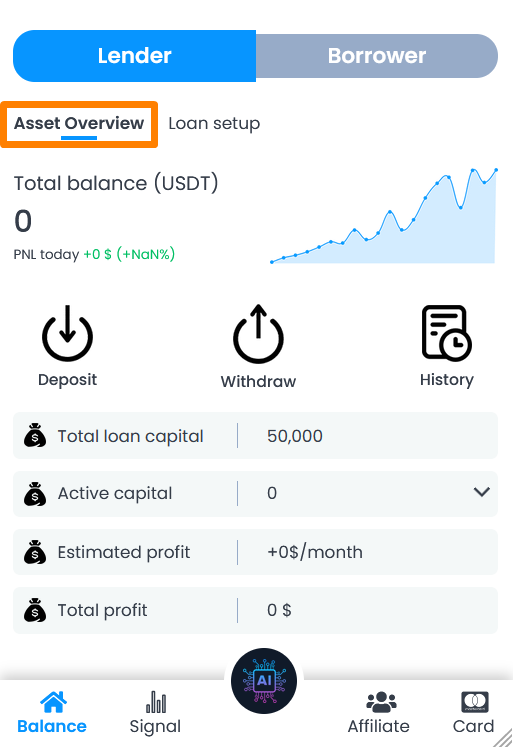
You can deposit or withdraw USDT from the Lending Pool at any time.

<figure><img src="https://4187880329-files.gitbook.io/~/files/v0/b/gitbook-x-prod.appspot.com/o/spaces%2Fxe8pEEJiLymEufx07tjx%2Fuploads%2FjEpptSJ9sMAbpg5lJXtR%2FScreenshot_11.png?alt=media&amp;token=2a79261b-4443-4907-9d12-ebd2c332654e" alt="" width="370"><figcaption></figcaption></figure>

### Step 6

Manage your loans and enjoy profits when Borrowers come to you.

<figure><img src="https://4187880329-files.gitbook.io/~/files/v0/b/gitbook-x-prod.appspot.com/o/spaces%2Fxe8pEEJiLymEufx07tjx%2Fuploads%2FJpUxqHzSt41XOfnCcJrO%2FScreenshot_12.png?alt=media&amp;token=cf8affab-8133-4421-a9b9-fd0c9a66ae16" alt="" width="257"><figcaption></figcaption></figure>